
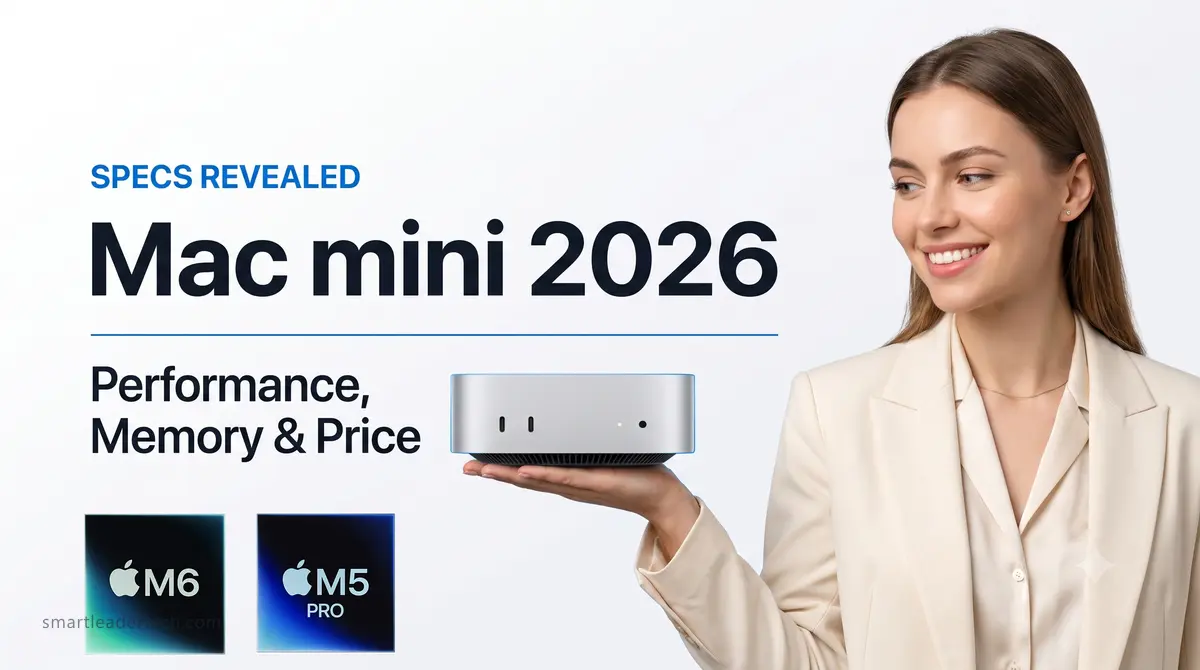
The Mac mini M6 is the first Mac built on Apple’s 2-nanometer process.
Until now, a new process node landed in iPhone chips first and trickled down to the Mac later.
This time the order flipped.
Apple says the CPU is 40% faster and AI tasks run up to 4x faster than the previous generation.
Memory and storage, though, still start at 16GB and 256GB — the same as two years ago — while the starting price has climbed to $899.
This post walks through which spec fits which kind of work and compares the price of each configuration so you can land on the best choice.
It also sums up what this generation means next to the M4.
ℹ️ This post includes official product images provided by Apple, informational graphics based on official specs, and AI-generated concept images. Concept images may differ from the actual product.
📌 Key Takeaways
[Confirmed]
- Apple’s first 2nm process, 12-core CPU and 12-core GPU
- Dual 16-core Neural Engine, 32 cores in effect
- 2.5Gb Ethernet standard, Wi-Fi 7 and Bluetooth 6
[What’s Changed]
- Up to 40% faster CPU, 4x faster AI, 2x faster graphics than the previous-generation M4 (Apple’s own testing)
- Ethernet moves from 1Gb to 2.5Gb as standard
- Ethernet is the only wired port that changed
- Memory bandwidth up from 120 to 153GB/s (at 16GB)
- Base memory stays at 16GB, storage stays at 256GB
[Release Date, Price & Configurations]
- Officially available September 22, 2026
- 16GB · 256GB — $899
[Still Unknown]
- Third-party benchmarks and real-world performance (after September 22)
- Fan noise and sustained performance under heavy load
- Actual SSD read and write speeds
[Bottom Line] If local AI is the point, start at 24GB, where the bandwidth widens too. If it isn’t, the base configuration is plenty.
- 📌 Key Takeaways
- 1. Mac mini M6 performance: how much faster is it than the M4?
- 2. Mac mini M6 vs M4: the generational changes
- 3. Mac mini M6 memory: is 16GB enough?
- 4. Mac mini M6 storage starts at 256GB
- 5. Mac mini M6 vs M5 Pro: where do they diverge?
- 6. Mac mini M6 price: how much did it go up?
- 7. Mac mini M6 release date and when to buy
- 💡 FAQ
- ✨ Wrapping Up
1. Mac mini M6 performance: how much faster is it than the M4?
Apple says the Mac mini M6 is up to 40% faster on CPU, 4x faster on AI tasks, and 2x faster on graphics than its predecessor.
The comparison point is the previous-generation Mac mini M4 in a 10-core, 32GB, 2TB configuration, measured by Apple in July 2026.
The structural change is worth more of your attention than the numbers.
According to Apple Newsroom, the M6 is the first chip Apple has built on a 2nm process, and both the CPU and GPU move from 10 cores to 12.
On top of that, every GPU core now carries a Neural Accelerator — circuitry dedicated to AI math.
That’s a first for the Mac mini.
Here are the headline performance figures.
| Metric | Apple’s figure | Comparison |
|---|---|---|
| CPU | Up to 40% faster | M4 (10-core · 32GB · 2TB) |
| AI tasks | Up to 4x | Same |
| Graphics | Up to 2x | Same |
| LM Studio prompt processing | Up to 4.8x | Same |
| Cyberpunk 2077 ray tracing | Up to 2x | Same |
| Storage speed | Up to 2x | Not disclosed |
LM Studio is an app for running AI language models directly on your own machine.
The LM Studio prompt processing row measures how long it takes from submitting a question to the first words of the answer.
Keep in mind that all of these come from Apple’s own testing. Third-party benchmarks won’t land until after the official release.
☑️ The cores now split into three tiers
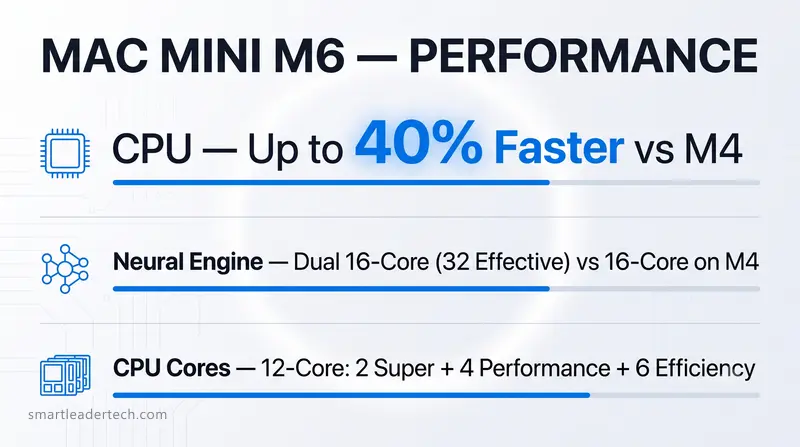
Saying it went from 10 cores to 12 misses the point of this change, because the way the cores are divided has changed.
The previous-generation M4 had two tiers: four performance cores and six efficiency cores.
The M6 adds a middle tier, landing on three — 2 super + 4 performance + 6 efficiency.
There’s one thing worth flagging here.
The M4’s four performance cores are what the M6 counts as super cores.
The tier names shifted down a notch, so the performance cores in the two generations share a name but are different cores.
The net result: the top tier drops from four cores to two, four new mid-tier performance cores join in, and the total lands at 12.
Those new performance cores draw less power than the super cores while taking a share of the work.
It’s a layout that pays off when you run several things at once, and it’s where Apple’s multithreaded gains come from.
The efficiency cores handle background tasks, same as the previous generation.
Splitting cores across three tiers used to be reserved for higher-end chips like the M5 Pro.
The M6 is the first base chip to get it.
Personally, I see this as the biggest structural difference between the two generations.
Count cores alone and it reads as a modest bump of two, but this is really the generation where the high-end chip’s architecture came down to the base model.
☑️ The dual Neural Engine and local AI
The Neural Engine — a separate cluster of cores dedicated to AI work — was a single 16-core unit in the previous-generation Mac mini M4.
The M6 packs two of those 16-core engines, for 32 cores in effect.
The system is built to use both engines at once, which by Apple’s measure delivers up to 2x the performance of the previous generation.
The interesting part is how that lines up against the higher-end chip.
On the Neural Engine alone, the base M6 (dual 16-core) has twice as many cores as the higher-end M5 Pro (single 16-core).
The assumption that the step-up model wins on every line doesn’t hold this generation.
The GPU is aimed at AI too.
With a Neural Accelerator attached to every core, GPU compute for AI climbs sharply.
That’s why Apple describes the Mac mini as a machine you leave running and hand AI work to.
2. Mac mini M6 vs M4: the generational changes
Going from the previous-generation Mac mini M4 to the M6, four things changed: the chip, memory bandwidth, wireless standards, and Ethernet.
Base memory at 16GB and storage at 256GB are the same across both generations.
Size, weight, and the physical ports carry over unchanged.
Here’s the generational shift in table form.
| Spec | Mac mini M4 (2024) | Mac mini M6 (2026) |
|---|---|---|
| Process | 3nm | 2nm |
| CPU | 10-core (4 performance + 6 efficiency) | 12-core (2 super + 4 performance + 6 efficiency) |
| GPU | 10-core | 12-core + Neural Accelerator per core |
| Neural Engine | 16-core | Dual 16-core (32 cores in effect) |
| Memory bandwidth | 120GB/s | 153GB/s (16GB) / 170GB/s (24GB and up) |
| Wireless | Wi-Fi 6E · Bluetooth 5.3 | Wi-Fi 7 · Bluetooth 6 |
| Ethernet | 1Gb standard | 2.5Gb standard |
| Thunderbolt | 4 × 3 | 4 × 3 |
| Size · weight | 12.7×12.7×5.0cm | Same |
| Base configuration | 16GB · 256GB | 16GB · 256GB |
☑️ The physical ports are unchanged
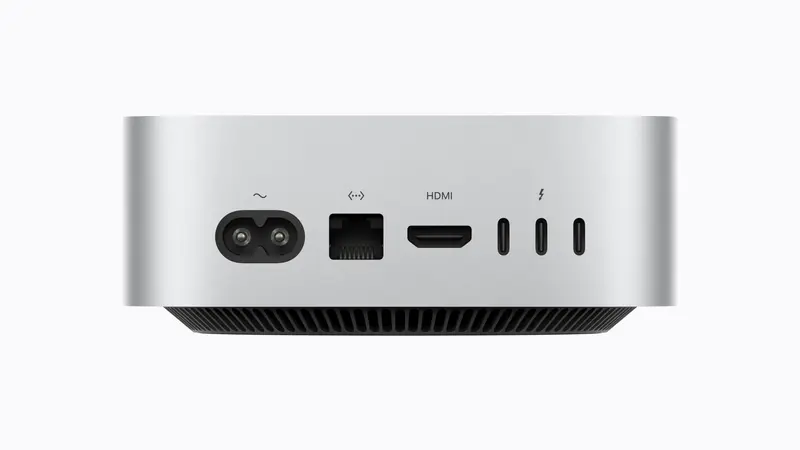
The port layout is identical across both generations: two USB-C ports and a 3.5mm jack up front, three Thunderbolt ports plus HDMI and Ethernet around back.
The front USB-C ports aren’t Thunderbolt — they’re USB 3 at 10Gb/s.
Ethernet is the one port that changed this generation.
The standard moves from 1Gb to 2.5Gb, and 10Gb remains a paid option on both generations.
Thunderbolt stays at 4, capping out at the same 40Gb/s as before.
Only the step-up M5 Pro model uses Thunderbolt 5.
3. Mac mini M6 memory: is 16GB enough?
Mac mini M6 memory starts at 16GB and tops out at 32GB.
What matters is that bandwidth changes with capacity.
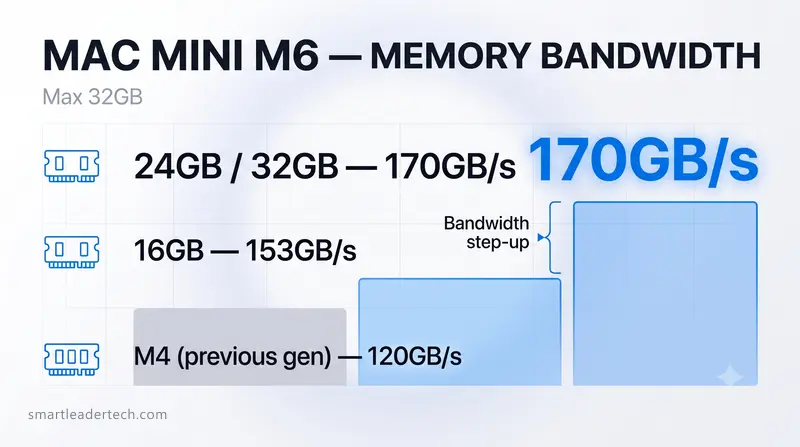
The base 16GB runs at 153GB/s, and the 170GB/s figure Apple highlights only appears at 24GB and above.
| Memory | Bandwidth | Upgrade cost |
|---|---|---|
| 16GB (base) | 153GB/s | — |
| 24GB | 170GB/s | +$200 |
| 32GB | 170GB/s | +$400 |
Personally, if documents, the web, and light photo editing are your main use, I’d say 16GB is plenty.
If local AI is the reason you’re buying this thing, 24GB is effectively the starting line, because that’s the point where capacity and bandwidth go up together.
☑️ Why memory bandwidth and capacity matter for local AI
Memory performance for local AI breaks into two pieces.
One is capacity.
An AI model is a file made of tens of billions of numbers fixed during training, and the whole file has to load into memory to run.
Short on capacity and the bigger models simply won’t run at all.
The other is bandwidth.
AI produces an answer one character at a time, and every character means reading the entire loaded model again.
If the pipe feeding that read is narrow, you can have compute to spare and still crawl.
That’s exactly why HBM (High Bandwidth Memory) is drawing so much attention in the chip market right now.
On AI servers too, the bottleneck isn’t compute — it’s that pipe.
The Mac mini’s memory isn’t HBM, but the principle that bandwidth drives AI performance is the same.
That said, there’s no measured data yet on how much of a real-world difference 153GB/s versus 170GB/s actually makes.
4. Mac mini M6 storage starts at 256GB
Mac mini M6 storage starts at 256GB, with 512GB, 1TB, and 2TB available.
That’s the same starting point as the M4.
Apple says storage is up to 2x faster than the previous generation but hasn’t published actual read and write speeds.
Once macOS and the stock apps take their share, 256GB doesn’t leave much room.
If you lean on external drives and the cloud and price comes first, though, you can start here.
If you keep photo and video libraries on the machine or install several development toolchains, raise the capacity from the start.
The Mac mini’s internal storage can’t be expanded after purchase.
☑️ The 512GB upgrade is the priciest step
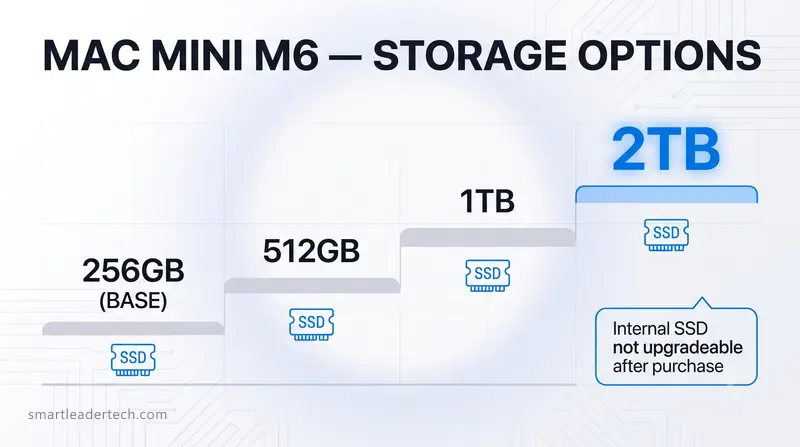
The cost per gigabyte differs by tier, and the most expensive one is the first step from 256GB to 512GB.
| Step | Upgrade cost | Cost per TB |
|---|---|---|
| 256 → 512GB | +$200 | $800 |
| 512GB → 1TB | +$300 | $600 |
| 1 → 2TB | +$500 | $500 |
That first step runs about 1.6x the per-terabyte rate of the 1TB-and-up tiers.
Go from the base 256GB all the way to 2TB and the storage upcharge alone comes to $1,000, more than the $899 machine itself.
The same $200 buys you either 8GB more memory or 256GB more storage.
Personally, if I had to pick one, I’d take the memory. Storage you can shore up later with an external SSD, and memory you can’t.
On top of that, the moment you step up to 24GB, the bandwidth rises with it.
One caveat: an external SSD only helps with files you can move off, like photos and video.
macOS and your apps have to live on the internal drive, so if you install a lot of software, raise the storage first.
5. Mac mini M6 vs M5 Pro: where do they diverge?
The 2026 Mac mini splits into two models by chip.
The base one gets the M6, new to the Mac mini, while the step-up model uses the M5 Pro that arrived in the MacBook Pro back in March.
The M5 Pro starts at $1,699 in its 24GB · 512GB configuration, close to double the M6’s base configuration, and it’s a higher-tier chip.
It leads on most lines, with one exception. The base M6 has twice the Neural Engine cores that handle AI math.
Apple says that layout delivers up to 2x the AI compute of the previous generation’s single 16-core engine.
| Spec | M6 | M5 Pro |
|---|---|---|
| Process | 2nm | 3rd-gen 3nm (2 dies) |
| CPU | 12-core (2 super + 4 performance + 6 efficiency) | 15-core (5 super + 10 performance) |
| GPU | 12-core | 16-core |
| Neural Engine | Dual 16-core (32 cores in effect) | 16-core |
| Memory bandwidth | 153 / 170GB/s | 307GB/s |
| Max memory | 32GB | 64GB |
| Storage starts at | 256GB | 512GB |
| Thunderbolt | 4 (40Gb/s) | 5 (120Gb/s) |
| Starting price | $899 | $1,699 |
When local AI is on the table, memory is where the M5 Pro earns its place.
The M5 Pro starts at 24GB · 512GB and can go up to 64GB, and its 307GB/s bandwidth is double the M6’s base configuration.
The M6’s 32GB handles models up to around 32 billion parameters.
To run anything at 70 billion or more, you need the M5 Pro, which can be configured to 64GB.
The M5 Pro comes in two versions with different core counts.
A 15-core CPU with a 16-core GPU, and an 18-core CPU with a 20-core GPU.
Both start with 24GB of memory and 512GB of storage.
| Configuration | Price |
|---|---|
| 15-core CPU · 16-core GPU / 24GB / 512GB | $1,699 |
| 18-core CPU · 20-core GPU / 24GB / 512GB | $1,899 |
| Memory 48GB / 64GB | +$600 / +$1,000 |
| Storage 1TB / 2TB | +$300 / +$800 |
The memory and storage upcharges are the same on both configurations.
Pick 64GB of memory and either one adds $1,000.
☑️ Thunderbolt 4 versus Thunderbolt 5
The M6 runs Thunderbolt 4 at up to 40Gb/s; the M5 Pro runs Thunderbolt 5 at up to 120Gb/s.
That gap shows up in two scenarios. The first is connecting external displays.
Both cap at three, but the conditions differ.
The M6 drives only two displays from a single Thunderbolt port, so running three means using at least two ports.
The M5 Pro can connect all three from one port. Display performance differs too.
On the M6 the third display is capped at 5K 60Hz, while the M5 Pro can push all three to 6K 60Hz.
The reason is the DisplayPort version behind the display standard: 1.4 on the M6, 2.1 on the M5 Pro.
The second is clustering several Mac minis together.
With Thunderbolt 5 you can link multiple Mac minis, pool their memory, and run a larger AI model.
The M6’s Thunderbolt 4 doesn’t support that.
6. Mac mini M6 price: how much did it go up?

The Mac mini M6 price increase is 50%, and it’s also 12.5%.
The figure changes depending on which point in time you compare against.
Here’s how Mac mini pricing has moved over time.
| Point in time | Configuration | Price |
|---|---|---|
| M4 launch price (Nov 2024) | M4 · 16GB · 256GB | $599 |
| M4 revised price (Jun 2026) | M4 · 16GB · 256GB | $799 |
| M6 new price (Aug 2026) | M6 · 16GB · 256GB | $899 |
Measured against the M4’s launch price, the Mac mini M6 price is $300, or 50.1%, higher.
Measured against the June 2026 revised price, it’s $100, or 12.5%, higher.
Both figures are correct, because there was one price increase in between.
On the July earnings call, CEO Tim Cook said memory prices were climbing at an unprecedented rate and that the company had raised prices reluctantly.
Final pricing may vary by retailer and available promotions.
☑️ Mac mini M6 versus MacBook Air M5
For that kind of money, couldn’t you just get a laptop?
The thought follows naturally.
They’re different kinds of machines, but the price bands overlap, so it’s worth a quick look.
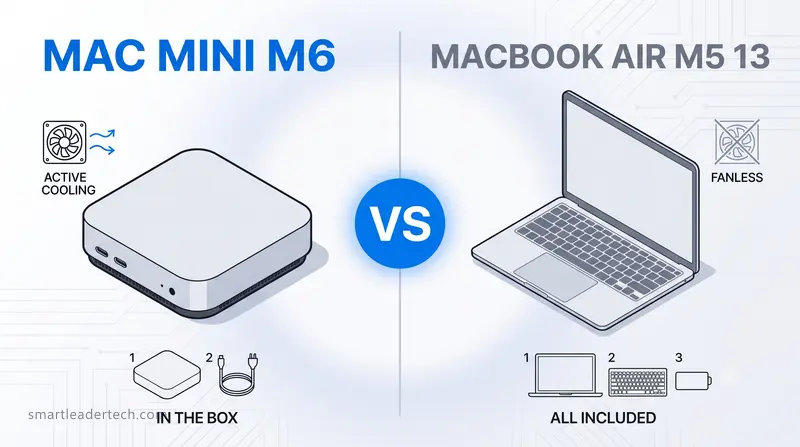
One thing to watch when you compare them: the MacBook Air M5 starts at 512GB, so the Mac mini has to be matched at 512GB for the comparison to hold.
| Spec | Mac mini M6 (16GB · 512GB) | MacBook Air M5 13 (16GB · 512GB) |
|---|---|---|
| Current price | $1,099 | $1,299 |
| In the box | Machine + power cord | Display, keyboard, and battery included |
For reference, the 13-inch MacBook Air went from $1,099 to $1,299 in the June 2026 increase.
That $200 gap, purely in terms of what’s in the box, comes down to whether a screen, a keyboard, and a battery are attached.
What about performance?
With no measured M6 numbers yet, you have to gauge it off the previous-generation M4.
| Spec | Mac mini M6 | Previous-gen Mac mini M4 | MacBook Air M5 13 |
|---|---|---|---|
| CPU cores | 12 | 10 | 10 |
| Cooling | Fan | Fan | Fanless |
| Geekbench 6 single | Not yet measured | 3,781 | About 4,195 |
| Geekbench 6 multi | Not yet measured | 14,858 | Around 17,000 |
The MacBook Air M5 held a slight edge over the previous-generation Mac mini M4.
But going by Apple’s stated 40% CPU gain over the previous-generation M4, the M6 is expected to pull well ahead of the MacBook Air M5.
One is a desktop with a fan and the other a fanless laptop, so sustained performance under a long load differs too.
7. Mac mini M6 release date and when to buy
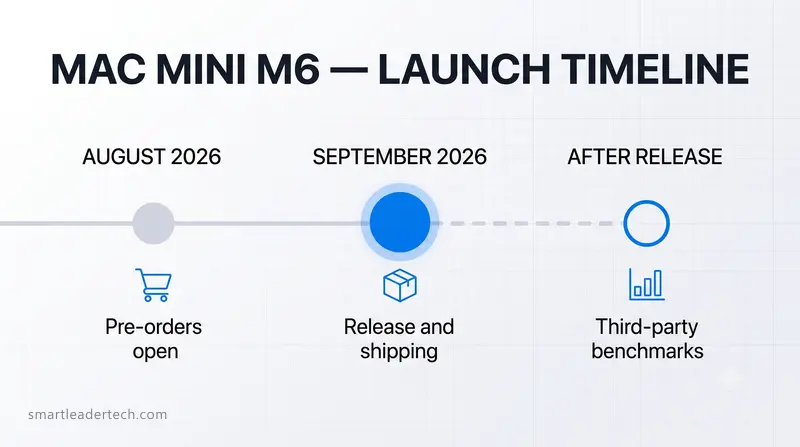
The official Mac mini M6 release date is September 22, 2026.
Deliveries begin that day, along with sales at Apple Store locations and authorized resellers.
Pre-orders opened on August 25.
Personally, if you’re planning on the base configuration, I don’t see much reason to wait for measured numbers.
Even if only half of Apple’s figures hold up, the gain over the M4 is clear, and there’s nothing to choose on the base configuration anyway.
If you’re weighing 24GB or more, or the M5 Pro, waiting for real measurements is the better move.
It’s a decision that swings several hundred dollars or more, and there’s still no measured data on the bandwidth difference or the performance gap between the two chips.
💡 FAQ
Q1. Does the Mac mini M6 come with macOS 27 preinstalled?
9to5Mac reported that the M6 Mac mini ships with macOS 27 Golden Gate preinstalled. Apple’s product page doesn’t list a version.
Either way, macOS updates are free, so even if an older build is on there you can move up right from Settings.
Q2. Which users actually need 10 Gigabit Ethernet?
With the standard moving up to 2.5Gb, the case for it is weaker than it used to be.
It’s worth considering if you keep a NAS (network-attached storage) at home or in the office and move large video files back and forth often.
It has nothing to do with your internet plan’s speed and only matters for transfers between devices on the same network. The upgrade costs $100.
Q3. Does the Mac mini come with a monitor and keyboard?
No. The box holds the machine and a power cord, so a display, keyboard, and mouse are on you.
If you already have a monitor and keyboard, just plug them in. If you’re starting from scratch, budget for those too.
✨ Wrapping Up
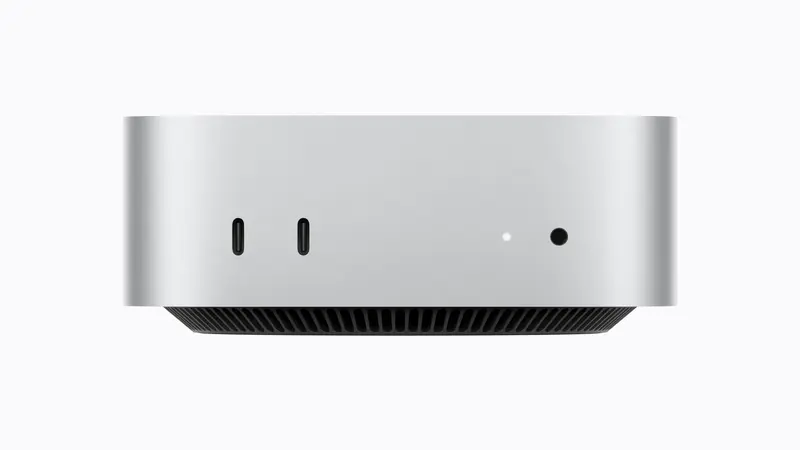
Judged on the chip alone, the Mac mini M6 is a substantial generational change.
It brings Apple’s first 2nm process, a 12-core CPU, and a dual Neural Engine, and by Apple’s measure the CPU is up 40% and AI up 4x over the previous generation.
If your work centers on documents and the web, the base configuration is plenty.
If local AI is the goal, 24GB is the starting line.
And if you’re at the point of needing the M5 Pro with 64GB, take a look at the Mac Studio that was announced alongside the Mac mini.
What’s left is measurements and hands-on reports.
Thermals and sustained performance, SSD speeds, and whether Apple’s performance figures actually hold up in practice — all of that surfaces after September 22.
Which configuration looks right to you?
Drop your thoughts below 🚀