The Samsung S26 Ultra has once again claimed its spot at the center of the premium smartphone market in 2026.
Unveiled on February 25, 2026, it arrived with a unique weapon — the world’s first Privacy Display — but user reactions since launch have been sharply divided.
If you’re wondering, “Is it actually worth $1,299?” — we’ve got you covered.
From official specs to real-world pros and cons, pricing, and competitor comparisons, this is the only guide you need.
ℹ️ This post contains spec-based informational images and AI-generated concept images. Concept images may differ from the actual product.
📌 Key Takeaways — The Galaxy S26 Ultra at a Glance
For those short on time, here’s the bottom line.
Clear Improvements
- Thinner and lighter body (7.9mm / 214g)
- 60W wired charging support
- Main camera upgraded to f/1.4 aperture for better low-light performance
- World’s first hardware-based Privacy Display
- Snapdragon 8 Elite Gen 5 chipset
Lingering Weaknesses
- 5,000mAh battery capacity unchanged
- No built-in Qi2 magnets, making wireless charging inconvenient
- Noticeable image quality drop when Privacy Display is active
- Incremental upgrade over the S25 Ultra
Who Should Buy It
- Users coming from the S23 Ultra or older
- Anyone drawn to Privacy Display, S Pen, and the Galaxy AI ecosystem
- Those looking for a top-tier Android flagship
Market Response
Pre-orders across the U.S., Europe, and other major markets saw double-digit growth over the previous generation, with over 70% of all global pre-orders concentrated on the Ultra model. MWC 2026 GLOMO ‘Best in Show’ award winner.
- 📌 Key Takeaways — The Galaxy S26 Ultra at a Glance
- 1. Performance and Design — Thinner and Lighter, but Titanium Is Gone
- 2. Privacy Display — The World's First Hardware-Based Screen Security
- 3. Camera — The Lenses Got Seriously Brighter
- 4. Galaxy AI — It Moves Before You Ask
- 5. Charging and Connectivity
- 6. One UI 8.5 and Software
- 7. Pros and Cons Revealed After Launch
- 8. Samsung S26 Price
- 💡 FAQ
- ✨ Final Verdict
1. Performance and Design — Thinner and Lighter, but Titanium Is Gone
☑️ Samsung S26 Ultra Specs
The best way to appreciate the Samsung S26 Ultra specs is to line them up against the predecessor side by side.
| Category | S25 Ultra | S26 Ultra |
|---|---|---|
| Display | 6.9″ QHD+ Dynamic AMOLED 2X | 6.9″ QHD+ Dynamic AMOLED 2X, 2,600 nits (peak) |
| Processor | Snapdragon 8 Elite for Galaxy | Snapdragon 8 Elite Gen 5 for Galaxy (3nm) |
| RAM / Storage | 12GB / 256·512·1TB | 12GB (256·512GB), 16GB (1TB) |
| Battery | 5,000mAh / Wired 45W / Wireless 15W | 5,000mAh / Wired 60W / Wireless 25W |
| Frame Material | Titanium | Armor Aluminum 2 |
| Protection | Gorilla Armor 2 | Front Gorilla Armor 2 + Rear Gorilla Glass Victus 2 |
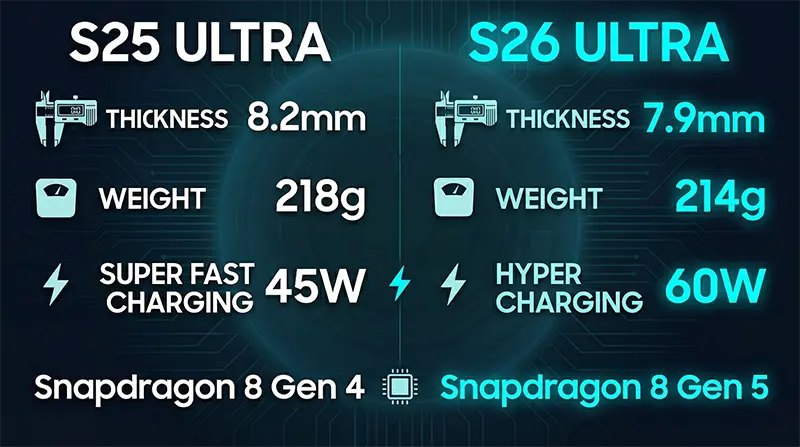
| Thickness / Weight | 8.2mm / 218g | 7.9mm / 214g |
| OS | One UI 7 (Android 15) | One UI 8.5 (Android 16) |
| Colors | Titanium Silverblue + 4+3 options | Cobalt Violet, Sky Blue + 4+2 options |
| Water Resistance | IP68 | IP68 (unchanged) |
☑️ Body Changes
The most immediately noticeable change in the Galaxy S26 Ultra specs is the thickness and weight.
It slimmed down from the S25 Ultra’s 8.2mm and 218g to 7.9mm and 214g.
The corners have also been noticeably rounded.
The signature sharp-edged Ultra design has softened considerably, bringing it in line with the S26 and S26+ for a more unified look, and the in-hand feel is significantly more comfortable.
☑️ Material Change — Love It or Hate It
The frame material switched from titanium to Armor Aluminum 2.
This change contributed to the weight reduction, but there’s no shortage of voices expressing disappointment about losing a premium material.
The front is protected by Corning Gorilla Armor 2, the rear by Gorilla Glass Victus 2, and water and dust resistance remains at IP68.
☑️ Performance
The processor is the Snapdragon 8 Elite Gen 5 for Galaxy, used globally across all units.
While the Samsung S26 and S26+ use the Exynos 2600 in some regions, the Ultra sticks to a Snapdragon-only configuration worldwide.
According to Samsung, it delivers 19% faster CPU, 24% faster GPU, and 39% faster NPU performance over the previous generation, and the vapor chamber (the internal heat dissipation system) has been enlarged by roughly 15%.
Real-world performance reviews have been consistently positive.
In Mrwhosetheboss’s 2026 battery and thermal test, the S26 Ultra clocked 12 hours of battery life (3rd overall) while ranking as one of the coolest-running devices in the lineup.
☑️ Battery and RAM
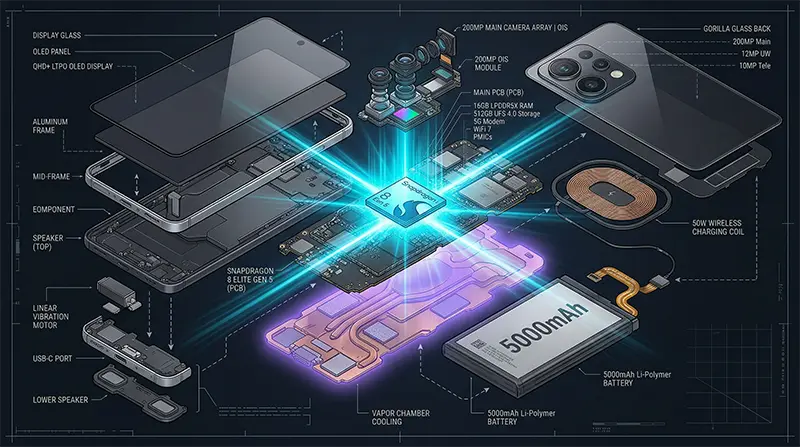
The battery sits at 5,000mAh — identical to the S25 Ultra.
Improved chipset efficiency has reportedly led to modest real-world endurance gains, but in a market where competitors like the OPPO Find N6 (6,000mAh) are aggressively adopting high-capacity silicon-carbon batteries, keeping the same capacity for three straight years is the one thing nearly every reviewer called out.
RAM is 12GB for the 256GB and 512GB models, with only the 1TB model getting 16GB.
Samsung has partially used 16GB RAM in Galaxy devices before, but this is the first time 16GB has been applied globally and universally to the 1TB tier.
2. Privacy Display — The World’s First Hardware-Based Screen Security
☑️ How It Works
The single biggest talking point of the Samsung S26 Ultra is undeniably the Privacy Display.
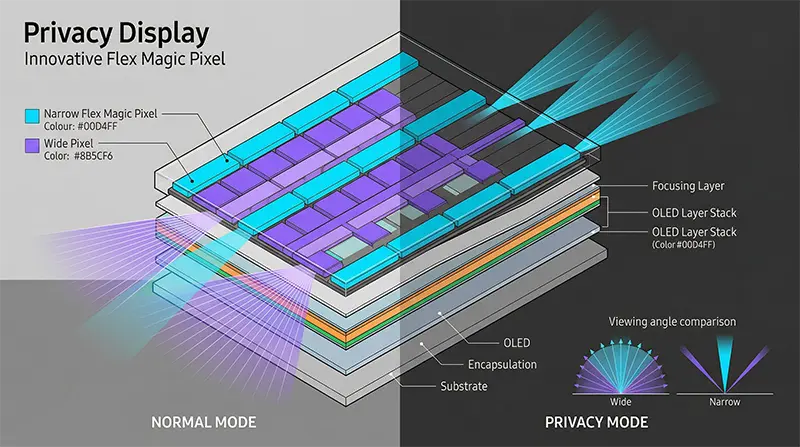
The core technology is Flex Magic Pixel, a system Samsung Display spent over five years developing.
Inside the OLED panel, Narrow pixels (limited viewing angle) and Wide pixels (broad viewing angle) are arranged in alternating rows — think odd and even lines interleaved across the display.
In Normal mode, both pixel types are active, delivering the full wide viewing angle you’d expect from any flagship OLED.
When you activate Privacy mode, the Wide pixels shut off and only the Narrow pixels remain active.
Because Narrow pixels are engineered to project light almost exclusively forward, the screen looks crisp head-on but turns dark and unreadable from the side.
According to LTT Labs testing, content becomes significantly faded beyond 30°, and at 60° it’s virtually impossible to make out.
The critical difference from stick-on privacy filters is that those films permanently reduce brightness and clarity, whereas Samsung’s Privacy Display returns to standard OLED image quality the moment you turn it off.
☑️ How to Set It Up and Real-World Use
There are three ways to activate it.
- Quick Panel toggle: Tap the icon in the notification shade for instant on/off. You can also assign it to a double-press of the side button.
- Per-app auto-activation: Go to Settings → Privacy Display → Conditions for turning on → Apps, and designate specific apps — banking, messaging, and so on — to trigger Privacy mode automatically when opened.
- Condition-based auto-activation: Automatically activates when entering a PIN or password, or when notification pop-ups appear.
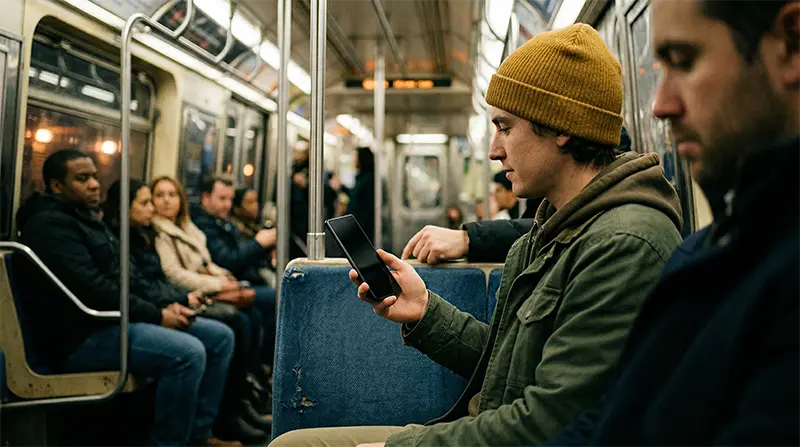
Whether you’re checking messages on the subway, opening a pay stub at a coffee shop, or entering a payment PIN, you can physically block the view from anyone next to you.
Turning on Maximum Privacy Protection mode extends the blocking range to more extreme angles, but contrast and brightness drop noticeably, so it’s not ideal for all-day use.
One important note: this feature is exclusive to the S26 Ultra.
The standard Samsung S26 and S26+ do not have the required panel hardware.
Samsung has stated it will evaluate expanding the technology to other devices based on customer feedback, and there are also leaks suggesting Chinese smartphone OEMs will launch similar technology in the second half of 2026.
3. Camera — The Lenses Got Seriously Brighter
☑️ Main Camera: f/1.7 → f/1.4
The Galaxy S26 Ultra camera upgrade is one of the most visually obvious improvements.
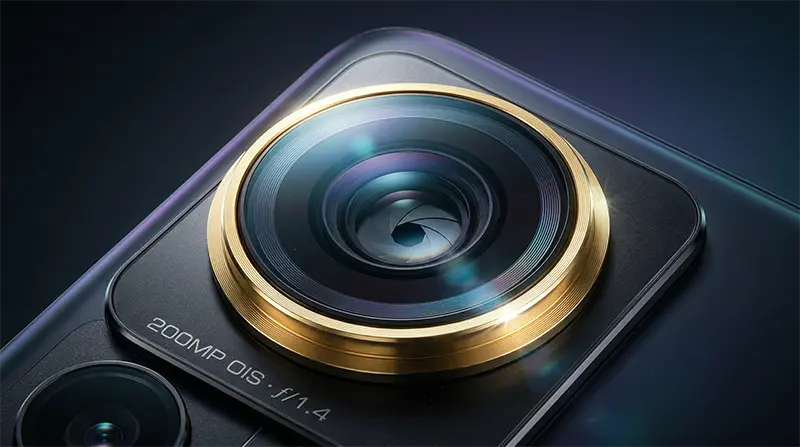
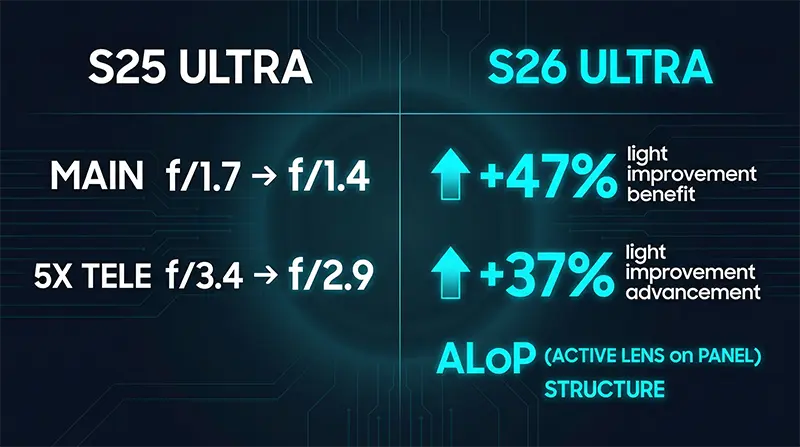
The 200MP main camera aperture widened from the S25 Ultra’s f/1.7 to f/1.4.
In terms of area, that means roughly 47% more light hits the sensor, which directly translates to reduced noise and sharper detail in low-light environments.
Major outlet reviews consistently confirmed lower noise and improved detail in low-light photos, with most noting that you can get satisfying results in dim indoor settings without touching any manual adjustments.
That said, the sensor size remains 1/1.3″ — unchanged from the S25 Ultra — so the hardware gap with Chinese flagships packing larger sensors is still there.
☑️ ALoP — A Structural Overhaul for the 5x Telephoto
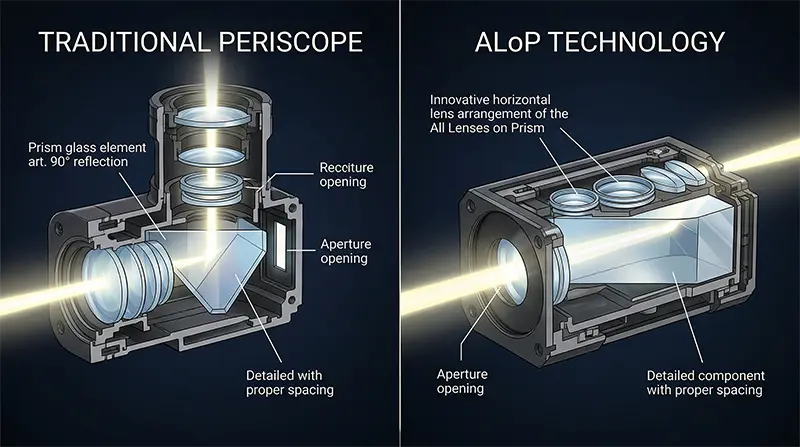
Traditional periscope telephoto cameras use a prism to bend light 90°, creating room for a long lens assembly inside the phone’s body without making it thicker.
It’s the key technology that enables high-magnification optical zoom in a slim form factor.
However, because the lenses sit vertically behind the prism in this conventional layout, there was always a limit to how thin the module could get.
ALoP (All Lenses on Prism) takes those vertically stacked lenses and lays them flat on top of the prism surface, achieving the same zoom performance while cutting module height by 22%.
This structural change also impacted image quality.
The lens entrance shifted from a rectangular to a circular shape, producing bokeh that looks more natural and DSLR-like.
The entrance itself also got bigger, widening the aperture from f/3.4 to f/2.9 — meaning roughly 37% more light enters the lens.
There is a clear trade-off, though.
The minimum focus distance jumped from 26cm to 52cm — effectively doubling — which makes close-up tele-macro shooting significantly harder.
If you’ve been using the 5x telephoto to shoot flowers or food up close, this is a real step backward.
☑️ Full Camera Spec Comparison
| Category | S25 Ultra | S26 Ultra | Change |
|---|---|---|---|
| Main aperture | f/1.7 | f/1.4 | +47% light intake |
| 5x telephoto aperture | f/3.4 | f/2.9 | +37% light intake |
| 5x telephoto structure | Periscope | ALoP | 22% thinner module, circular bokeh |
| 5x min. focus distance | 26cm | 52cm | Tele-macro disadvantage |
| Ultrawide aperture | f/2.2 | f/1.9 | Improved |
| 3x telephoto aperture | f/2.4 | f/2.4 | Unchanged |
| AI ISP front camera | Not applied | Applied | Selfie quality improved |
| Nightography | Main lens focus | All lenses | Improved |
| Horizon Lock | None | New | Video horizon stabilization |
☑️ Nightography and Front Camera AI ISP
Nightography is Samsung’s low-light optimization feature.
Previously it was concentrated mainly on the main camera, but on the S26 Ultra it now extends across all lenses — ultrawide, 3x, and 5x telephoto included.
For video, a new Horizon Lock feature keeps the frame level without a gimbal.
Note that this is a different function from OIS (optical image stabilization).
The front camera receives an AI ISP (Image Signal Processor) for the first time ever in a Galaxy device.
It uses the same 12MP sensor as the S25 Ultra, but with AI intervening in the image processing pipeline, fine details like individual hair strands and eyebrows are rendered more accurately, and skin tone reproduction has improved.
The field of view has also widened, making group selfies noticeably easier.
4. Galaxy AI — It Moves Before You Ask
The defining keyword for Samsung S26 series AI is ‘Agentic AI.’
The biggest shift this generation isn’t just about following commands — it’s about the AI understanding context, proactively suggesting actions, and executing them before you even ask.
☑️ Agentic AI
Now Nudge
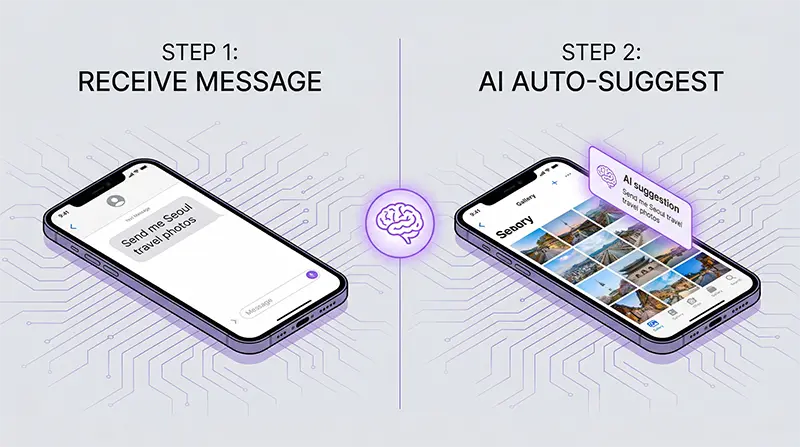
This feature analyzes your messages in real time and surfaces relevant actions as automatic pop-ups — no app-switching required.
For example, if a friend texts “Send me those vacation photos,” it automatically searches your Gallery for relevant pictures and suggests them.
If you receive a message about a meetup, it checks your calendar and alerts you to any scheduling conflicts.
Currently, though, it only works with the default Messages app — third-party messaging apps like WhatsApp aren’t supported yet, so its real-world utility is still limited.
Call Screening (AI Call Filtering)
When an unknown or suspected spam number calls, AI answers on your behalf and summarizes the caller’s purpose in real-time text.
If it determines the call is spam or a scam, it automatically ends the call.
Direct Voice Mail
If you don’t pick up or a set time passes, the call automatically switches to voicemail — and the caller’s message appears as live text on your lock screen.
No more playing back voicemail recordings later.
You can read the gist of the message right from your lock screen as it’s being left.
Creative Studio
This is a brand-new AI creation app introduced with the Samsung S26 series.
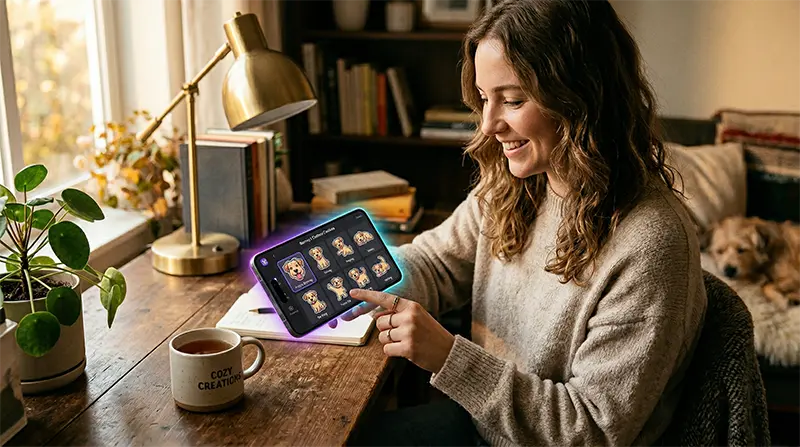
Feed it a photo, sketch, or text prompt, and the AI generates stickers, wallpapers, invitation cards, and more.
For example, upload a photo of your pet, and it produces a custom sticker set with various poses and expressions.
You can even just type “draw a dog” and get results.
The stickers are automatically added to Samsung Keyboard’s sticker tab, so you can use them like emoji in WhatsApp or iMessage, and share them via Quick Share too.
☑️ Existing Feature Upgrades
Photo Assist on the S25 Ultra was mainly about removing unwanted elements.
On the S26 Ultra, it now supports adding new elements, plus editing through text and voice prompts.
You can restore a half-eaten cake to its original state, or convert a daytime photo into a night scene.
It supports natural language commands like “Brighten this image” or “Give it a golden-hour look,” and most edits are processed within 30 seconds.
Circle to Search has evolved from single-object recognition to multi-object simultaneous search.
Circle an entire outfit on a celebrity, and it finds similar matches for the top, bottom, and shoes individually — all at once.
There’s also a Try On feature that lets you virtually wear clothes you’ve found online using your own photo.
☑️ Bixby, Gemini, and Perplexity — A Triple AI Assistant Setup
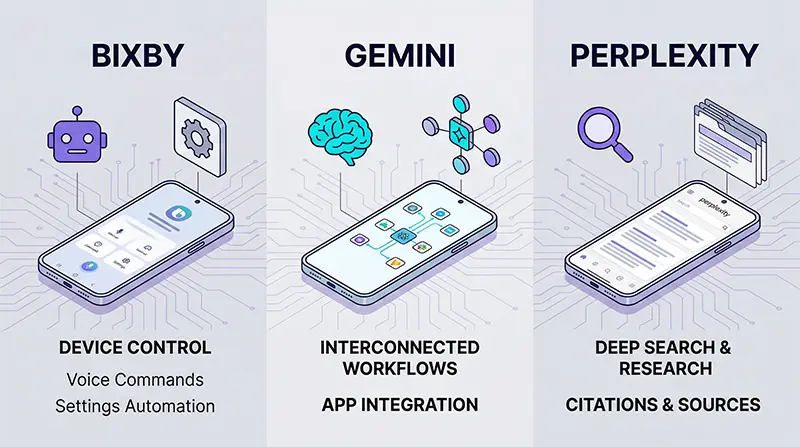
The Samsung S26 Ultra is also the first smartphone to ship with three AI assistants simultaneously.
Bixby
Its natural language understanding has been significantly upgraded — say “My eyes are tired,” and it will suggest activating Eye Comfort Shield.
Bixby is now specialized in device settings control.
Gemini
Powered by Google Gemini 3, it handles complex tasks like food delivery orders and ride-hailing in the background through multi-step automation.
For example, say “Order spicy chicken sandwiches from Uber Eats,” and the AI will ① open the delivery app → ② search for the item → ③ select it → ④ confirm the address → ⑤ proceed to checkout — all automatically.
Previously, you’d have to do each of these steps yourself.
Gemini connects and executes the entire sequence from a single command — and that’s what ‘multi-step automation’ means.
Sounds like a game-changer, right?
It absolutely is exciting, and I personally dove deeper into the feature thinking, “This is finally what a real AI agent looks like in everyday life.”
Here’s the reality, though.
Since the March 11, 2026 launch, it’s been available as a beta feature, currently available in the U.S. and South Korea in English.
Supported apps are also limited for now — primarily delivery and ride-hailing apps like Uber, Lyft, DoorDash, Grubhub, Uber Eats, and Starbucks.
In real-world testing, saying “Order a spicy chicken sandwich on Uber Eats” successfully gets the AI to open the app, find the menu item, and add it to your cart automatically.
However, you still have to confirm the final payment yourself.
The bottom line: this is a real, working AI agent feature, but it’s still in beta with limited app and regional support.
Admittedly, the current reality falls short of the promise.
But the fact that this kind of functionality is actually working now is meaningful in its own right, and here’s hoping the true AI agent era goes mainstream sooner rather than later.
Perplexity
This is an AI-powered search agent integrated into Samsung Internet browser.
With multiple tabs open, it can read and synthesize the content across all of them and deliver a consolidated answer through its ‘Ask AI’ feature.
How to Set Your Default Assistant
Head to Settings → Apps → Default Apps → Digital Assistant, where you can choose Bixby, Gemini, or Perplexity as your default — and switch freely at any time.
5. Charging and Connectivity
☑️ Wired 60W — The Fastest Ultra Has Ever Charged
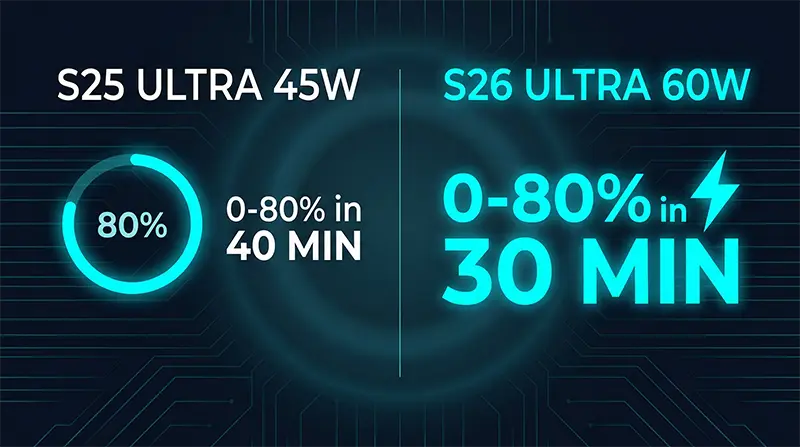
Wired charging jumped from the S25 Ultra’s 45W to 60W (Super Fast Charging 3.0).
Real-world measurements show 0 to 80% in about 30 minutes, and the difference compared to the S25 Ultra is genuinely noticeable.
☑️ Wireless 25W — The Gap Between Spec and Reality
Wireless charging supports up to 25W via Qi 2.2 (a major jump from the S25 Ultra’s 15W).
But Samsung chose not to include built-in magnets, citing the thinner design and potential magnetic interference with the S Pen and camera array.
To actually hit 25W, you need a Qi2-compatible magnetic case — and even with Samsung’s own official case, there are widespread reports of it struggling to reliably reach 25W.
According to 9to5Google, testing by case manufacturers like dbrand found that most setups topped out around 15W.
Reverse wireless charging (Wireless PowerShare) is also supported.
Place your Galaxy Buds or smartwatch on the back of the phone, and it charges from the phone’s battery at 4.5W output.
☑️ Quick Share ↔ AirDrop Compatibility
Quick Share now works with Apple’s AirDrop thanks to a software update, letting you send and receive files directly with iPhones, iPads, and Macs — no extra apps required.
6. One UI 8.5 and Software
The Samsung S26 Ultra ships with One UI 8.5 built on Android 16, and Samsung has once again committed to 7 years of OS and security updates — continuing the promise made with the S24 and S25 lines.
Quick Panel customization has been significantly expanded — you can now adjust icon size, order, and even slider orientation freely.
Post-launch updates have focused on security and stability, and the late-March global update officially added the Quick Share cross-platform sharing feature with Apple devices mentioned earlier.
7. Pros and Cons Revealed After Launch
☑️ Pros — What Reviewers and Users Agree On
Design praise leads the conversation.
The lighter body and rounded corners have drawn the most repeated compliment across both media outlets and user communities: the grip feels significantly better.
It’s the thinnest and lightest Ultra ever, and the return to aluminum actually improved everyday usability — a point many didn’t expect.
Performance and thermal management are excellent.
The Snapdragon 8 Elite Gen 5 paired with One UI 8.5 has been consistently described as blazing fast, and with the enlarged vapor chamber, heat is well controlled while battery efficiency also improved.
The Galaxy S26 Ultra camera low-light improvement is undeniable.
Thanks to the f/1.4 main lens and Nightography expansion across all lenses, low-light shooting results are visibly better — and reviewers are unanimous on this point.
Privacy Display
Genuinely useful on public transit and in shared spaces — that’s the clear consensus.
It’s also the core reason the device won the GLOMO ‘Best in Show’ award at MWC 2026.
One UI 8.5
Users are praising the snappy base performance and the expanded customization options.
☑️ Cons — Hard to Overlook
This is a product where the weaknesses are just as clearly defined as the strengths.
The Privacy Display trade-off is the biggest point of debate.
With Privacy mode on, effectively only Narrow pixels are active, and some users report a noticeable resolution drop.
There’s also criticism that it runs on 8-bit simulation rather than native 10-bit color.
The larger concern is that even with Privacy mode turned off, some users feel the viewing angles and screen reflections are worse than the S25 Ultra.
It’s undeniably innovative, but the pros and cons coexist in equal measure.
I personally had the chance to try the Samsung S26 Ultra before launch, and the first thing I noticed was a sense of visual dullness.
At first I couldn’t pinpoint why, but after using it for a bit, the brightness and clarity felt lower than my current phone.
It almost seemed like my phone at 70–80% brightness looked brighter and punchier than the S26 Ultra at full blast — and that ultimately became the deciding reason I passed on buying it.
Looking back, I suspect the Privacy Display’s panel structure may have been the culprit.
It was a brief hands-on session, so I could be off — and it’s possible Privacy Display was activated at the time.
Battery stuck at 5,000mAh
In an era where Chinese flagship brands are packing 6,000mAh or more, staying at the same capacity for three consecutive years is the one thing virtually every reviewer flagged.
No built-in Qi2 magnets
Samsung advertises 25W wireless charging on paper, but in practice even with a magnetic case, many users are stuck at around 15W.
Other Drawbacks
- Camera bump wobble: There are complaints about the phone rocking badly on flat surfaces because of the protruding camera module.
- Upgrade gap from S25 Ultra: Engadget called it a ‘stealth upgrade,’ and many reviewers described it as “feeling more like a software update.”
- Competitiveness vs. Chinese flagships: Camera sensor size, battery capacity, and display bit depth are all areas where the S26 Ultra comes across as more conservative than the latest from Xiaomi and OPPO — a criticism that keeps surfacing.
8. Samsung S26 Price
| Storage | Price |
|---|---|
| 256GB | $1,299.99 |
| 512GB | $1,499.99 |
| 1TB | $1,799.99 |
You can pick one up at Best Buy, Amazon, or Samsung.com — and keep an eye out for trade-in deals, which can knock several hundred dollars off.
💡 FAQ
✨ Final Verdict
The Samsung S26 Ultra delivers clear upgrades in Privacy Display, camera aperture innovation, Agentic AI, and 60W charging.
The design is the thinnest and lightest any Ultra has ever been, and performance, thermals, and One UI 8.5 stability are all top-notch.
On the flip side, the unchanged battery capacity, missing Qi2 magnets, Privacy Display’s image quality trade-offs, and conservative hardware relative to Chinese flagships are legitimate weak points.
Here’s the straightforward take: if you’re coming from an S23 Ultra or older, the upgrade will feel substantial.
If you’re on an S24 Ultra or S25 Ultra, unless Privacy Display is a must-have, sitting this one out is perfectly reasonable.
Personally, I’d give the S26 Ultra a 90 out of 100.
That’s not a bad score — it’s just that with Samsung, you can’t help but expect a 95.
The missing 5 points live in the battery and display departments, and whether the S27 closes that gap is absolutely worth watching.
So what’s your call — are you grabbing the Galaxy S26 Ultra now, or holding out until those last 5 points are filled in?
Drop your thoughts in the comments, and bookmark this page for when you’re ready to pull the trigger.